Tuesday, 7 August 2012

How to enter into a WEP Encrypted Network

Wi fi

Basic Entry into a WEP Encrypted Network

This Tutorial explains EVERYTHING in detail So, it is quite long. Enjoy.

1. Getting the right tools
This Tutorial is in Bt3 But Download The Latest Release Bt4.

Download Backtrack 4. It can be found here:

http://www.backtrack-linux.org/downloads/

I downloaded the Dvd iso and burned it to a Dvd. Insert your BT4 Dvd/usb drive and reboot your computer into BT4. I always load into the 3rd boot option from the boot menu. (VESA/KDE) You only have a few seconds before it auto-boots into the 1st option so be ready. The 1st option boots too slowly or not at all so always boot from the 2nd or 3rd. Experiment to see what works best for you.

2. Preparing the slave network for attack

Once in BT4, click the tiny black box in the lower left corner to load up a "Konsole" window. Now we must prep your wireless card.
Type:

airmon-ng

You will see the name of your wireless card. (mine is named "ath0") From here on out, replace "ath0" with the name of your card.
Now type:

airmon-ng stop ath0

then type:

ifconfig wifi0 down

then:

macchanger --mac 00:11:22:33:44:55 wifi0

then:

airmon-ng start wifi0

What these steps did was to spoof (fake) your mac address so that JUST IN CASE your computeris discovered by someone as you are breaking in, they will not see your REAL mac address. Moving on...
Now it's time to discover some networks to break into.

Type:

airodump-ng ath0

Now you will see a list of wireless networks start to populate. Some will have a better signal than others and it is a good idea to pick one that has a decent signal otherwise it will take forever to crack or you may not be able to crack it at all.
Once you see the network that you want to crack, do this:

hold down ctrl and type c

This will stop airodump from populating networks and will freeze the screen so that you can see the info that you need.

**Now from here on out, when I tell you to type a command, you need to replace whatever is in parenthesis with what I tell you to from your screen. For example: if i say to type:
-c (channel)
then dont actually type in
-c (channel)
Instead, replace that with whatever the channel number is...so, for example you would type:
-c 6
Can't be much clearer than that...lets continue...

Now find the network that you want to crack and MAKE SURE that it says the encryption for that network is WEP. If it says WPA or any variation of WPA then move on...you can still crack WPA with backtrack and some other tools but it is a whole other ball game and you need to master WEP first.

Once you've decided on a network, take note of its channel number and bssid. The bssid will look something like this --> 05:gk:30:fo:s9:2n
The Channel number will be under a heading that says "CH".
Now, in the same Konsole window, type:

airodump-ng -c (channel) -w (file name) --bssid (bssid) ath0

the FILE NAME can be whatever you want. This is simply the place that airodump is going to store the packets of info that you receive to later crack. You don't even put in an extension...just pick a random word that you will remember. I usually make mine "wepkey" because I can always remember it.

**Side Note: if you crack more than one network in the same session, you must have different file names for each one or it won't work. I usually just name them wepkey1, wepkey2, etc.

Once you typed in that last command, the screen of airodump will change and start to show your computer gathering packets. You will also see a heading marked "IV" with a number underneath it. This stands for "Initialization Vector" but in noob terms all this means is "packets of info that contain clues to the password." Once you gain a minimum of 5,000 of these IV's, you can try to crack the password. I've cracked some right at 5,000 and others have taken over 60,000. It just depends on how long and difficult they made the password.

Now you are thinking, "I'm screwed because my IV's are going up really slowly." Well, don't worry, now we are going to trick the router into giving us HUNDREDS of IV's per second.

3. Actually cracking the WEP password

Now leave this Konsole window up and running and open up a 2nd Konsole window. In this one type:

aireplay-ng -1 0 -a (bssid) -h 00:11:22:33:44:55 ath0

http://i574.photobucket.com/albums/ss184...eplay1.jpg

This will send some commands to the router that basically cause it to associate with your computer even though you are not officially connected with the password. If this command is successful, you should see about 4 lines of text print out with the last one saying something similar to "Association Successful :-)" If this happens, then good! You are almost there. Now type:

aireplay-ng -3 -b (bssid) -h 00:11:22:33:44:55 ath0

http://i574.photobucket.com/albums/ss184...eplay2.jpg

This will generate a bunch of text and then you will see a line where your computer is gathering a bunch of packets and waiting on ARP and ACK. Don't worry about what these mean...just know that these are your meal tickets. Now you just sit and wait. Once your computer finally gathers an ARP request, it will send it back to the router and begin to generate hundreds of ARP and ACK per second. Sometimes this starts to happen within seconds...sometimes you have to wait up to a few minutes. Just be patient. When it finally does happen, switch back to your first Konsole window and you should see the number underneath the IV starting to rise rapidly. This is great! It means you are almost finished! When this number reaches AT LEAST 5,000 then you can start your password crack. It will probably take more than this but I always start my password cracking at 5,000 just in case they have a really weak password.

Now you need to open up a 3rd and final Konsole window. This will be where we actually crack the password. Type:

aircrack-ng -b (bssid) (filename)-01.cap

Remember the filename you made up earlier? Mine was "wepkey". Don't put a space in between it and -01.cap here. Type it as you see it. So for me, I would type wepkey-01.cap
Once you have done this you will see aircrack fire up and begin to crack the password. typically you have to wait for more like 10,000 to 20,000 IV's before it will crack. If this is the case, aircrack will test what you've got so far and then it will say something like "not enough IV's. Retry at 10,000." DON'T DO ANYTHING! It will stay running...it is just letting you know that it is on pause until more IV's are gathered. Once you pass the 10,000 mark it will automatically fire up again and try to crack it. If this fails it will say "not enough IV's. Retry at 15,000." and so on until it finally gets it.

http://i574.photobucket.com/albums/ss184...crack1.jpg

If you do everything correctly up to this point, before too long you will have the password! now if the password looks goofy, dont worry, it will still work. some passwords are saved in ASCII format, in which case, aircrack will show you exactly what characters they typed in for their password. Sometimes, though, the password is saved in HEX format in which case the computer will show you the HEX encryption of the password. It doesn't matter either way, because you can type in either one and it will connect you to the network.

Take note, though, that the password will always be displayed in aircrack with a colon after every 2 characters. So for instance if the password was "secret", it would be displayed as:
se:cr:et
This would obviously be the ASCII format. If it was a HEX encrypted password that was something like "0FKW9427VF" then it would still display as:
0F:KW:94:27:VF
Just omit the colons from the password, boot back into whatever operating system you use, try to connect to the network and type in the password without the colons and presto! You are in!

It may seem like a lot to deal with if you have never done it, but after a few successful attempts, you will get very quick with it. If I am near a WEP encrypted router with a good signal, I can often crack the password in just a couple of minutes.

I am not responsible for what you do with this information. Any malicious/illegal activity that you do, falls completely on you because...technically...this is just for you to test the security of your own network. :-)

I will gladly answer any legitimate questions anyone has to the best of my ability.
HOWEVER, I WILL NOT ANSWER ANYONE THAT IS TOO LAZY TO READ THE WHOLE TUT AND JUST ASKS ME SOME QUESTION THAT I CLEARLY ANSWERED. No one wants to hold your hand through this...read the tut and go experiment until you get it right

Here is some More**** Windows Run Commands****

Here is some More
       **** Windows Run Commands****
 
 
Windows Run Commands Accessibility Controls------- access.cpl
Add Hardware Wizard------- hdwwiz.cpl
Add/Remove Programs------- appwiz.cpl
Administrative Tools------- control admintools
Automatic Updates------- wuaucpl.cpl
Bluetooth Transfer Wizard------- fsquirt
Calculator------- calc
Certificate Manager certmgr.msc
Character Map charmap
Check Disk Utility------- chkdsk
Clipboard Viewer------- clipbrd
Command Prompt------- cmd
Component Services------- dcomcnfg
Computer Management------- compmgmt.msc
timedate.cpl------- ddeshare
Device Manager------- devmgmt.msc
Direct X Control Panel (If Installed)*------- directx.cpl
Direct X Troubleshooter------- dxdiag
Disk Cleanup Utility------- cleanmgr
Disk Defragment------- dfrg.msc
Disk Management------- diskmgmt.msc
Disk Partition Manager------- diskpart
Display Properties------- control desktop
Display Properties------- desk.cpl
Display Properties (w/Appearance Tab Preselected)------- control color
Dr. Watson System Troubleshooting Utility------- drwtsn32
Driver Verifier Utility------- verifier
Event Viewer------- eventvwr.msc
File Signature Verification Tool------- sigverif
Findfast------- findfast.cpl
Folders Properties------- control folders
Fonts------- control fonts
Fonts Folder------- fonts
Free Cell Card Game------- freecell
Game Controllers------- joy.cpl
Group Policy Editor (XP Prof)------- gpedit.msc
Hearts Card Game------- mshearts
Iexpress Wizard------- iexpress
Indexing Service------- ciadv.msc
Internet Properties------- inetcpl.cpl
IP Configuration (Display Connection Configuration)------- ipconfig /all
IP Configuration (Display DNS Cache Contents)------- ipconfig /displaydns
IP Configuration (Delete DNS Cache Contents)------- ipconfig /flushdns
IP Configuration (Release All Connections)------- ipconfig /release
IP Configuration (Renew All Connections)------- ipconfig /renew
IP Configuration (Refreshes DHCP & Re-Registers DNS)------- ipconfig /registerdns
IP Configuration (Display DHCP Class ID)------- ipconfig /showclassid
IP Configuration (Modifies DHCP Class ID)------- ipconfig /setclassid
Java Control Panel (If Installed) jpicpl32.cpl
Java Control Panel (If Installed)------- javaws
Keyboard Properties------- control keyboard
Local Security Settings------- secpol.msc
Local Users and Groups------- lusrmgr.msc
Logs You Out Of Windows------- logoff
Microsoft Chat------- winchat
Minesweeper Game------- winmine
Mouse Properties------- control mouse
Mouse Properties------- main.cpl
Network Connections------- control netconnections
Network Connections------- ncpa.cpl
Network Setup Wizard------- netsetup.cpl
Notepad------- notepad
Nview Desktop Manager (If Installed)------- nvtuicpl.cpl
Object Packager------- packager
ODBC Data Source Administrator------- odbccp32.cpl
On Screen Keyboard------- osk
Opens AC3 Filter (If Installed)------- ac3filter.cpl
Password Properties------- password.cpl
Performance Monitor------ perfmon.msc
Performance Monitor------- perfmon
Phone and Modem Options------- telephon.cpl
Power Configuration------- powercfg.cpl
Printers and Faxes------- control printers
Printers Folder------- printers
Private Character Editor------- eudcedit
Quicktime (If Installed)------- QuickTime.cpl
Regional Settings------- intl.cpl
Registry Editor------- regedit
Registry Editor------- regedit32
Remote Desktop------- mstsc
Removable Storage------- ntmsmgr.msc
Removable Storage Operator Requests------- ntmsoprq.msc
Resultant Set of Policy (XP Prof)------- rsop.msc
Scanners and Cameras------- sticpl.cpl
Scheduled Tasks------- control schedtasks
Security Center------- wscui.cpl
Services------- services.msc
Shared Folders------- fsmgmt.msc
Shuts Down Windows------- shutdown
Sounds and Audio------- mmsys.cpl
Spider Solitare Card Game------- spider
SQL Client Configuration------- cliconfg
System Configuration Editor------- sysedit
System Configuration Utility------- msconfig
System File Checker Utility (Scan Immediately)------- sfc /scannow
System File Checker Utility (Scan Once At Next Boot)------- sfc /scanonce
System File Checker Utility (Scan On Every Boot)------- sfc /scanboot
System File Checker Utility (Return to Default Setting)------- sfc /revert
System File Checker Utility (Purge File Cache)------- sfc /purgecache
System File Checker Utility (Set Cache Size to size x)------- sfc /cachesize=x
System Properties------- sysdm.cpl
Task Manager------- taskmgr
Telnet Client------- telnet
User Account Management------- nusrmgr.cpl
Utility Manager------- utilman
Windows Firewall------- firewall.cpl
Windows Magnifier------- magnify
Windows Management Infrastructure------- wmimgmt.msc

How to send sms from your mobile phone without a sender id....

Thursday, 2 August 2012

How To Remove or Deactivate Your Facebook Profile Timeline (100% working)
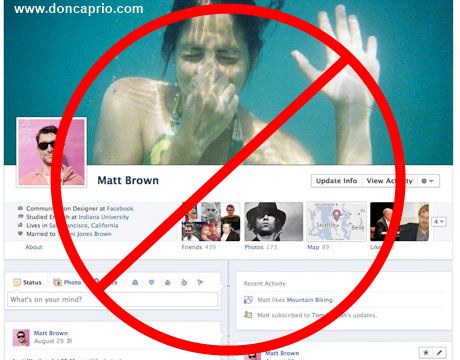
I am here with a great news for those who hate their Facebook timeline style. I also don't like it so much. Great news is from now you can  completely remove or deactivate your timeline.

Some days ago I wrote another post about the same topic. But, then that trick wasn't working. That's why I deleted this post. Again I am showing how can I remove or deactivate my timeline style.

Only you need to install an add-ons or extension 'Timeline Remove' for your Mozilla Firefox and Google Chrome or IE. At the time of writing this post I was using Mozilla Firefox 11.0 and Google Chrome 17.0.963.79. But I didn't face any problem to deactivate my Facebook timeline. Hope you also wont face any kind of problem. Okay, let me deactivate yours.

At first, click here and download 'Timeline Remove' for your browser.
Now you have to install it in your browser. To install this plugin you need to click an 'Allow' button in Mozilla Firefox and a 'Continue' button in Google Chrome.
Complete installing. Then see your profile. The timeline has gone. Am I right?

Tuesday, 31 July 2012

How o lock internet

Internet Lock v5.3.2 Full New Latest Version + Activation / Registration / License Key or Code Download Free

Description or Review Internet Lock 5.3.2
Inam Softwares: Best Softwares Collection Provide another best registered software is Internet Lock 5.3.2 Full Version With Serial Key/ Crack/Keygen/ Patch Free Download. Internet Lock is the access control and password protection solution for your internet connections and programs. With Internet Lock, you can fully control the internet connections and programs on your computer.

Restrict or password protect internet access. Schedule internet access. Protect internet programs on certain IP addresses or domains. Limit users access to only the web sites you specified, or keep them from accessing the unwanted web sites.


Download Free Internet Lock 5.3.2 Registered Software Provided by inam

Internet Lock 5.3.2 Free Download New Version + Serial Key, Reg key, Activation Key, License, Crack, Patch, Serial, number, key, keygen, registration key, Code, sn, free softwares

Give Helps to control internet programs and connections:

Restrict internet access.

Password protect internet access.
Block internet web sites.
Allow one or more web sites while blocking all others.
Prevent any user accounts from accessing internet.
Schedule internet access for any or all programs.
Any internet program can be protected: Internet Explorer, Firefox, Google Chrome, Outlook, FTP programs, Messengers..
Internet Lock 5.3.2 + Portable
Password: inam

Download Links: